German Legal Tech Hub
One system
for all the moving parts.
From first contact to booking, from programme to website, from newsletter to letter: the team works in one system, on desktop and on mobile.
All references

 DemoTry it yourself

 Demo, invented data
Case study · Network and events
German Legal Tech Hub GmbH. Hub OS: CRM, event management and administration for a legal tech network.
One network. One congress. One operating system.
The German Legal Tech Hub is the network behind the German Legal Tech Summit. Together with German Legal Tech Hub GmbH, ibx company is developing the Hub OS, one platform for both companies. It brings together CRM and sales, events and tickets, newsletters, social media, accounting and HR. Development started in September 2026, and the core areas are already live.
- Company
- German Legal Tech Hub and German Legal Tech Summit, two companies
- Services
- Concept and development, together with the Hub team
- Technology
- Custom web app with a mobile interface, own server and database
- Status
- In development since September 2026, core areas in operation

The German Legal Tech Hub is the network behind the German Legal Tech Summit. Two companies, a small team, a congress with speakers, exhibitors, partners and visitors.
The team worked with rented individual tools for contacts, sales, newsletters and tickets, plus a master list of around 1,400 contacts. An expensive licence package was on the table as the next step.
Instead, together with the team, we built a system of their own: the Hub OS. Since September it has grown week by week with the team’s daily work, and today it covers twelve areas with 85 subpages.
Before
- Contacts spread across several tools and a master list
- Every registration matched by hand and confirmed by bulk email
- Quotes and invoices in Word
- Sales, newsletters and tickets in separate services
- An expensive licence package planned as the next step
- Teamsells, plans and organises on desktop and mobile
- Hub OSone shared database for both companies
- Publicwebsites, newsletters, social media, letters
Connected Microsoft 365 and Teams · Stripe and Eventbrite · LinkedIn, Facebook, Instagram, Threads, YouTube · Canva · Letter dispatch · DATEV export · AI by Anthropic
Functions
What the Hub OS
covers.
Twelve areas, one database. The seven moments below show what this looks like in everyday work.
AI assistant Frida
Always at hand in the bottom right corner, by text, dictation or in a spoken conversation. She creates to dos, appointments, contacts and email drafts and reschedules events, each as a suggestion with a button and only with the person’s permissions.
Support agent
An AI handles the team’s reports on the note board. It answers questions with the data the reporting person is allowed to see, and passes errors and requests on to us with all details.
Own ticket shop
Tickets for the Summit are bought directly on its website, by card or on invoice, with an e-invoice and the ticket by email. Orders, codes and withdrawals are managed in the Hub OS.
Replying to comments
The team answers LinkedIn comments in the Hub OS, by hand or with an AI suggestion. New comments show up under the bell, further channels are prepared.
CRM and contacts
Companies, people, leads, customers and members in one place. Duplicates are found daily, and AI research suggests missing details.
Sales and pipeline
Several sales boards with probabilities, deals, matchmaking and reports. The AI shows where the team needs to act.
Quote to invoice
Quote, order confirmation and invoice as PDF, signed online with a timestamp, sent by email, by post or as an electronic invoice.
Events
One file per event with bookings, programme, floor plan, budget, guest list, project plan and statistics.
Speakers, exhibitors, partners
Invitations and reminders in German and English, dedicated profile portals and a web app for exhibitors.
Tickets and admission
Tickets from the shop and previous providers in one list, admission on mobile, certificate of attendance under § 15 FAO issued automatically.
Website content
Speakers, programme, exhibitors, partners, floor plan and magazine of the Summit come from the Hub OS, events also feed the Hub’s own website.
Newsletters and mailings
In-house sending with a builder, approval link, opens and clicks. Mailing lists maintain themselves based on rules.
Social media
Editorial calendar as a board, texts per channel, scheduled posting to LinkedIn, Facebook, Instagram, Threads and YouTube.
Content and campaigns
AI assistant for texts, Canva and a custom template studio, media library, LinkedIn ads with budget.
Correspondence and post
Letterheads per company, mail merge letters and real letter dispatch with printing, envelope and postage, also as registered post.
Accounting
The AI reads incoming invoices. Outgoing invoices, dunning, journal, bank and cash, export for the tax adviser.
Financial control and reports
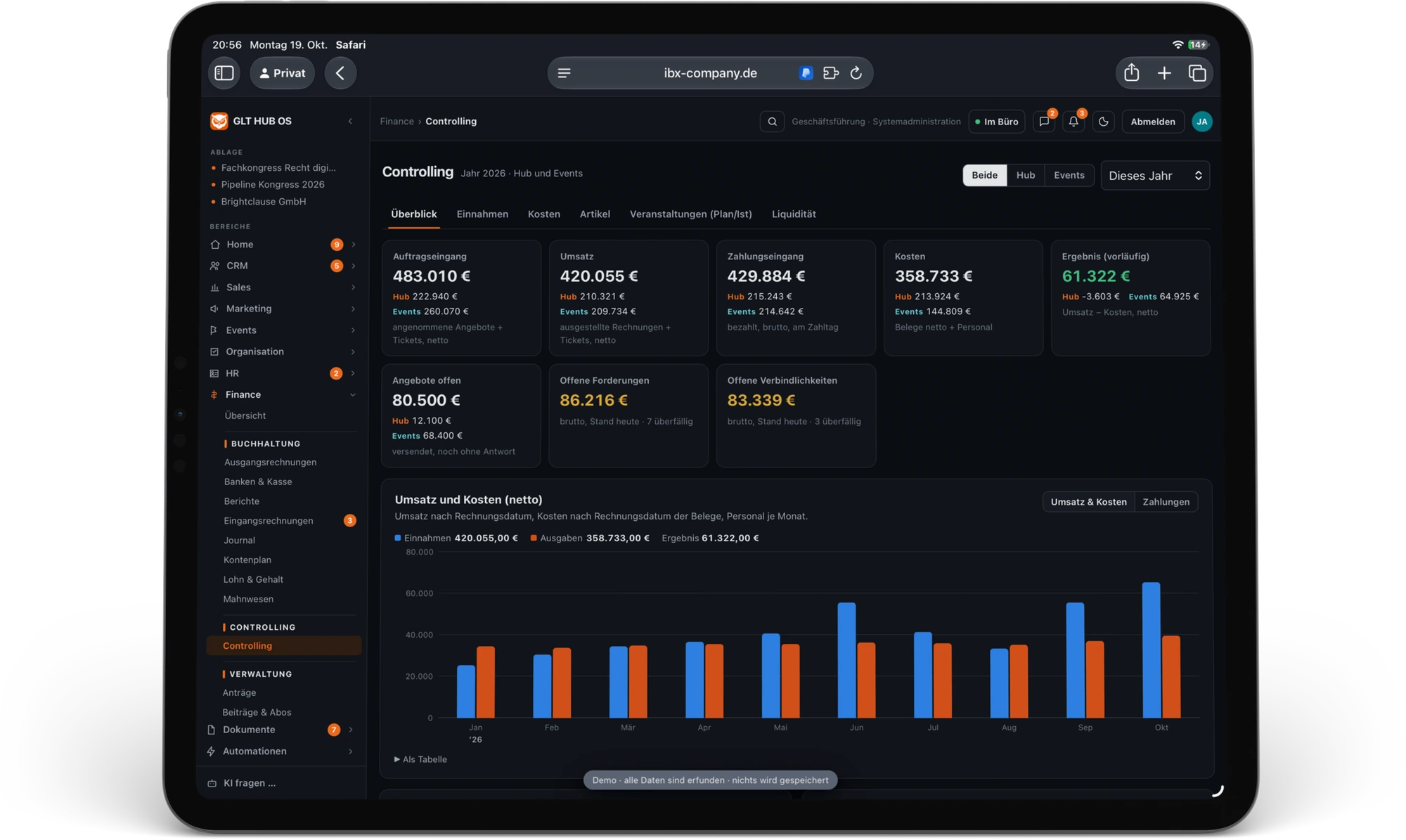
Plan and actuals per area and event, management accounts (BWA), open items, trial balance, liquidity forecast for 13 weeks.
HR and payroll
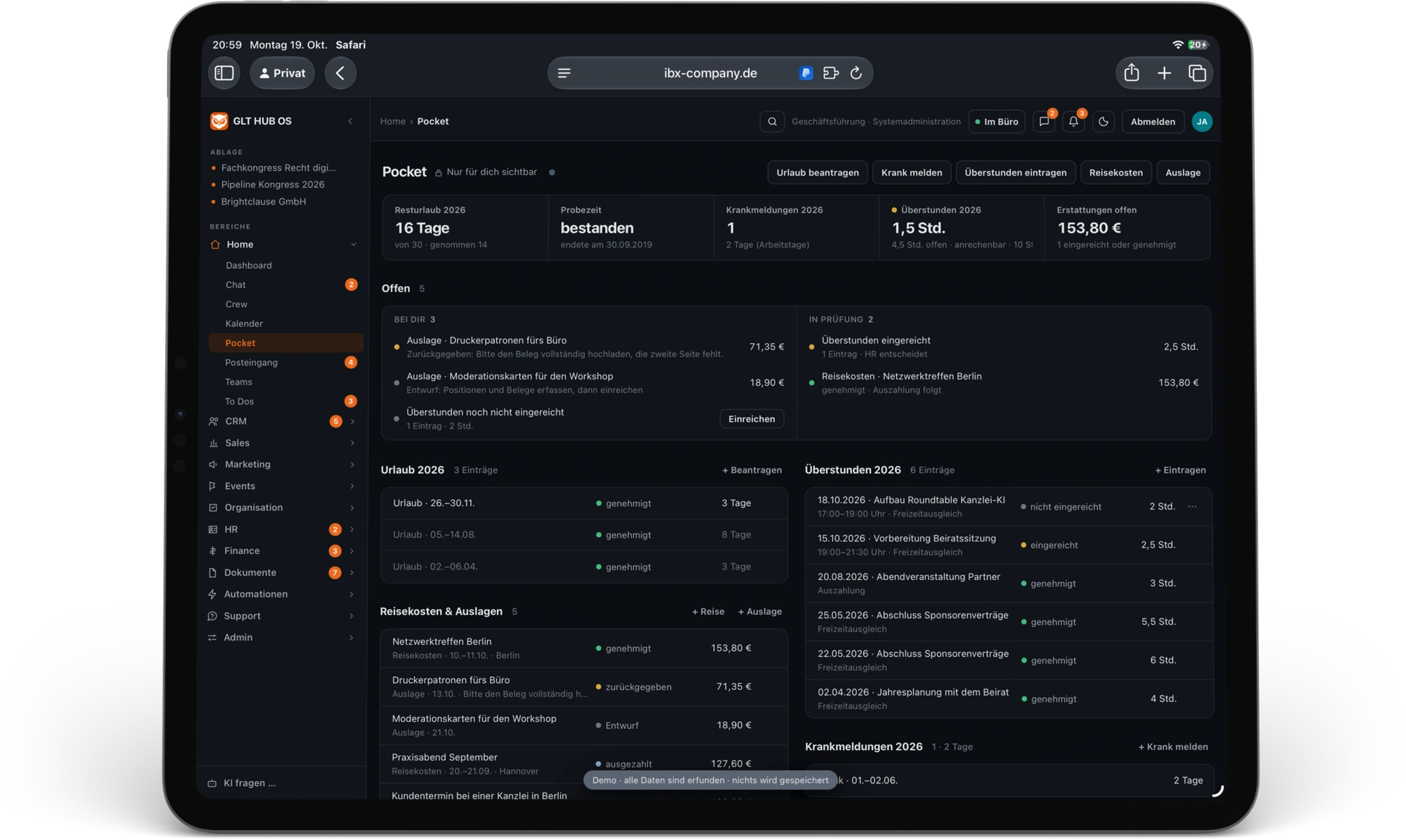
Personnel files, employment contracts, holidays, sick notes, travel expenses and payroll documents. Own payroll calculation on a trial basis.
Projects and tasks
Project plan per event with deadlines, tasks that can be assigned and passed on. The AI recognises tasks in Teams chats.
Inbox, calendar, chat
Outlook mailboxes, calendars and Teams chat directly in the system, documents from emails are filed automatically.
Filing and automations
Folders per company with full text search and AI summaries. After every event, thank you emails, reminders and certificates go out by themselves.


- TeamCreate a quote for ibx for a Silver exhibitor stand and send it to Michel Winkler for signature.
- FridaI have sent the quote for the Silver exhibitor stand to Michel Winkler at ibx company by email with a request for signature.
AI assistant
Say it once,
Frida gets it done.
Frida is the AI assistant in the Hub OS. She sits as an owl in the bottom right corner of every page and knows the entire database: contacts, deals, events, receipts and emails. You can type, dictate or talk to her like a colleague, and she can answer out loud.
Frida creates to dos, appointments, contacts, quotes and email drafts, reschedules events and sends reminders. Every step comes as a suggestion with a button and always runs only with the permissions of the person asking.
Decision in detailAn assistant instead of team chats
- Challenge
- Many questions and small requests went through chats in Teams. Every answer and every small task held someone in the team up.
- Decision
- Frida knows the database and the system itself. She answers questions and completes tasks, always only with the permissions of the person asking. Whatever she is to carry out, she proposes as a card with a button.
- In daily use
- Every question and every answer is kept in the AI log, so it is clear what Frida has done.
- In conversation
Switch on the microphone and speak, Frida answers out loud. The conversation carries on without restarting each time.
- Completing tasks
To dos, appointments, contacts, quotes and emails, as a suggestion with “Run”.
- Screenshots
Paste a screenshot of the page and Frida sees what it is about.
- Only your own permissions
Frida only sees what the person asking is allowed to see, and acts on their behalf.
 Demo, invented data
01Sell
From first contact
to paid invoice.
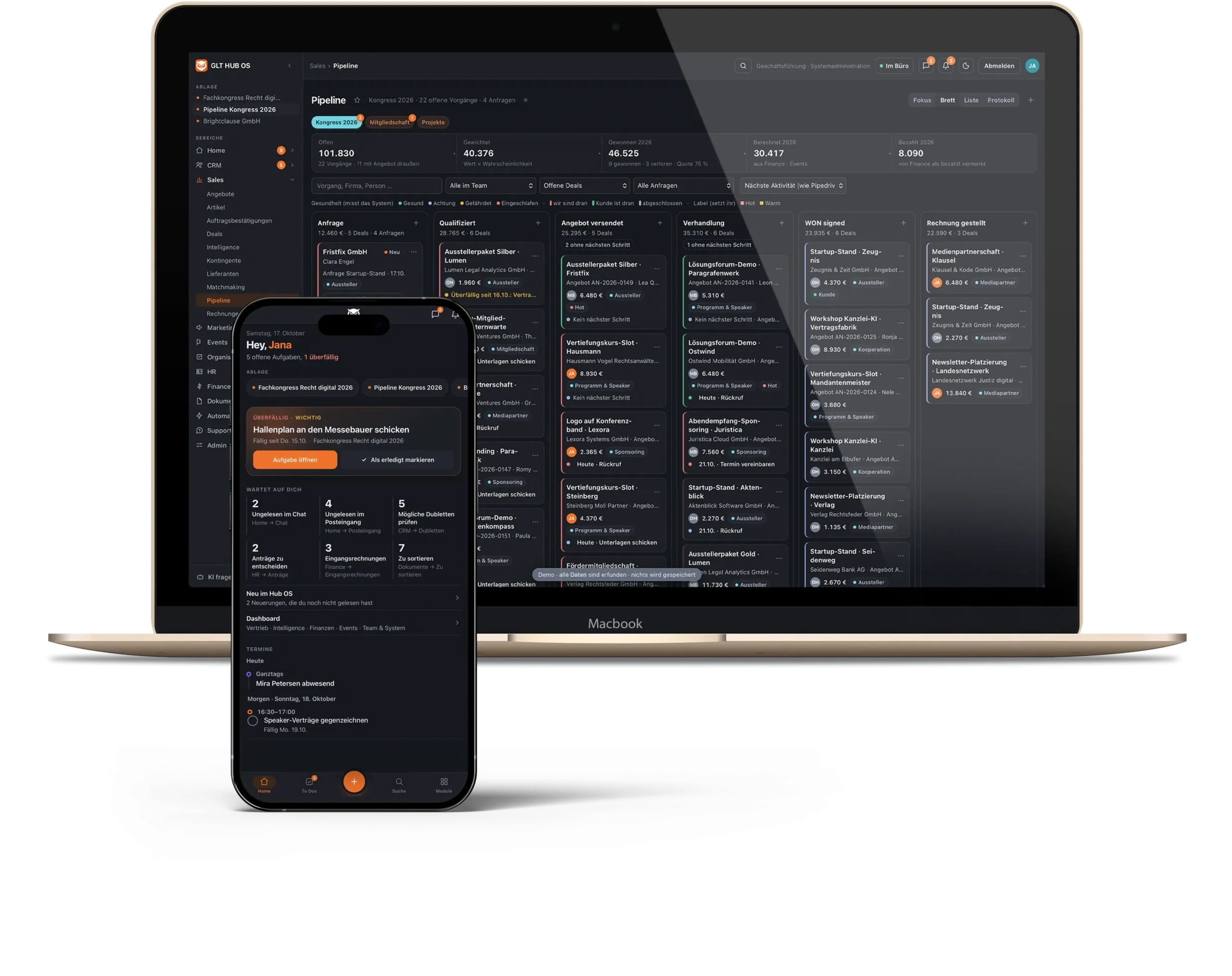
Companies, people and members are kept in one database. Every record shows activities, notes, emails from Outlook, receipts and correspondence. Sales run on several boards, and the team manages the columns and probabilities itself.
A deal becomes a quote, the quote becomes an order confirmation, and that becomes the invoice. Signing happens online with a timestamp, sending by email or as a letter.
Decision in detailTaking over instead of starting from scratch
- Challenge
- Contacts and deals were spread across several rented tools and a master list. Nobody wanted to lose data or habits in the switch.
- Decision
- The pipeline follows the structure the team already knew. All data from the previous tools has been migrated, and the system merges duplicates or links them across the group of companies.
- In daily use
- Sales has been running in the Hub OS since October, and the previous CRM is being phased out. Every morning, a traffic light shows which deals need the team’s attention.
- Duplicates and research
Duplicate contacts are found daily. The AI suggests missing details from the web and never writes anything by itself.
- Matchmaking
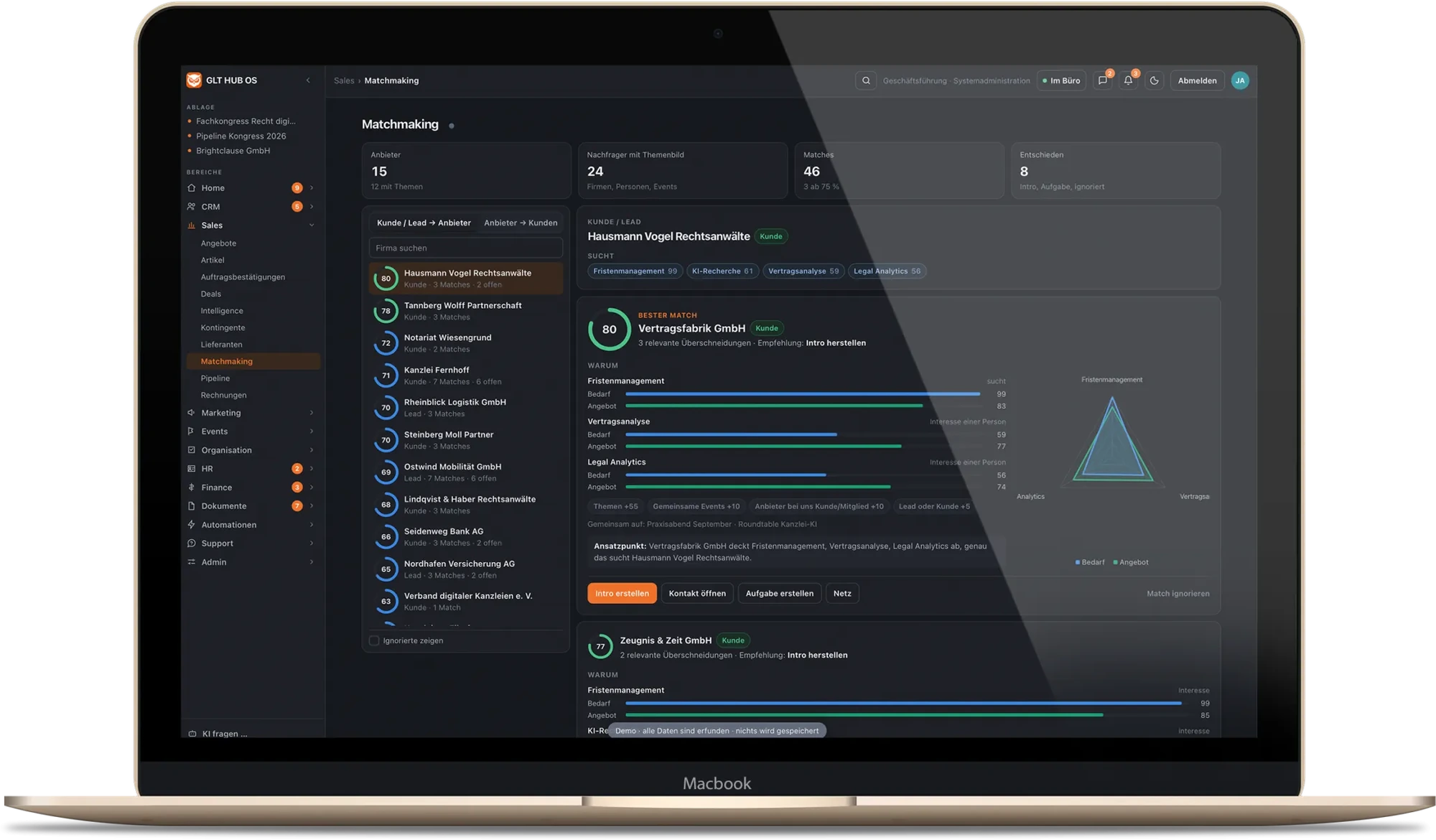
Who offers what, who is looking for what: the system suggests matching contacts in the network.
- Members
Terms, notice periods and cancellations at a glance, the membership contract is signed online.
- Products and allocations
Products in German and English with time windows such as Early Bird, free tickets per booking option.
02Host
A congress
in a single file.
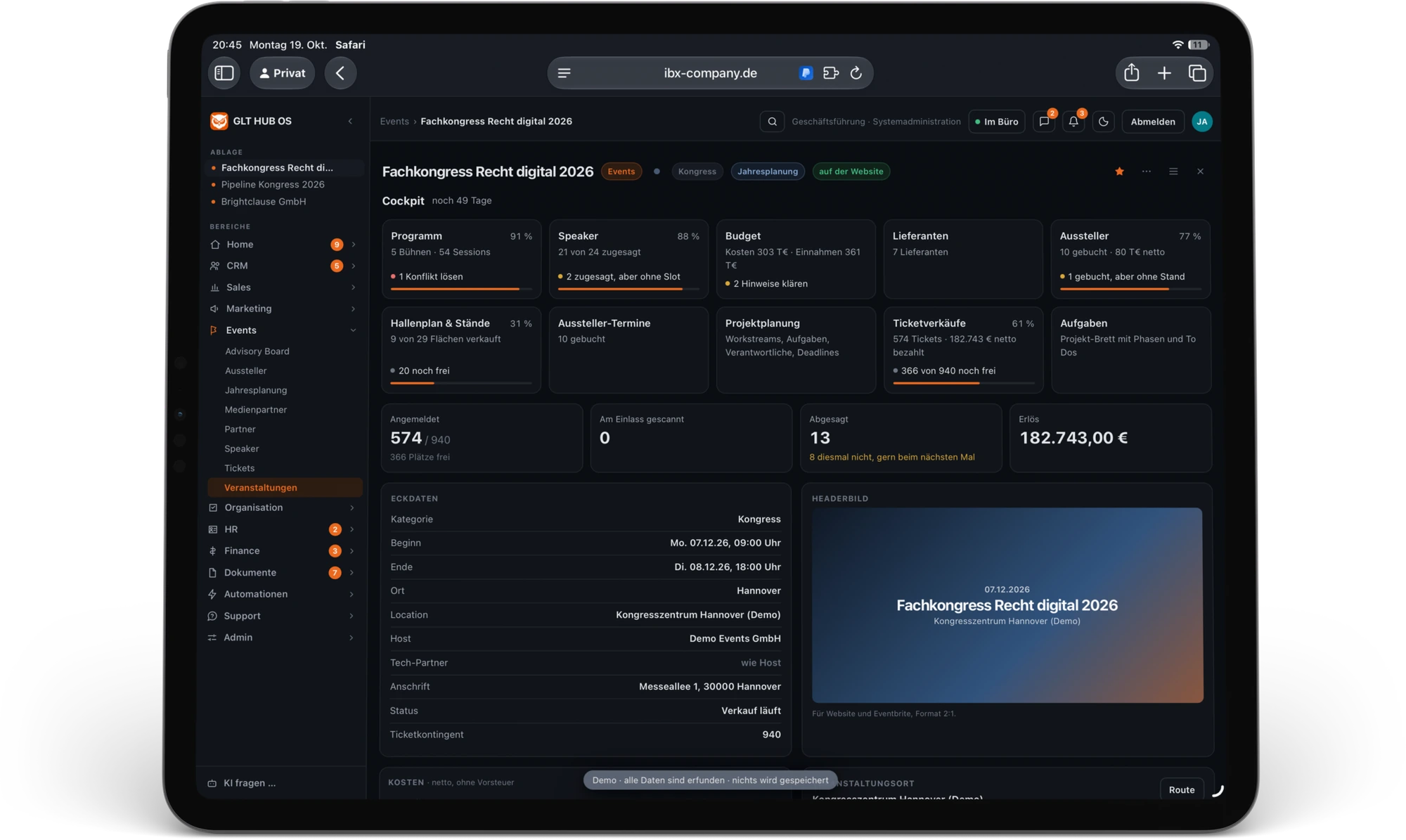
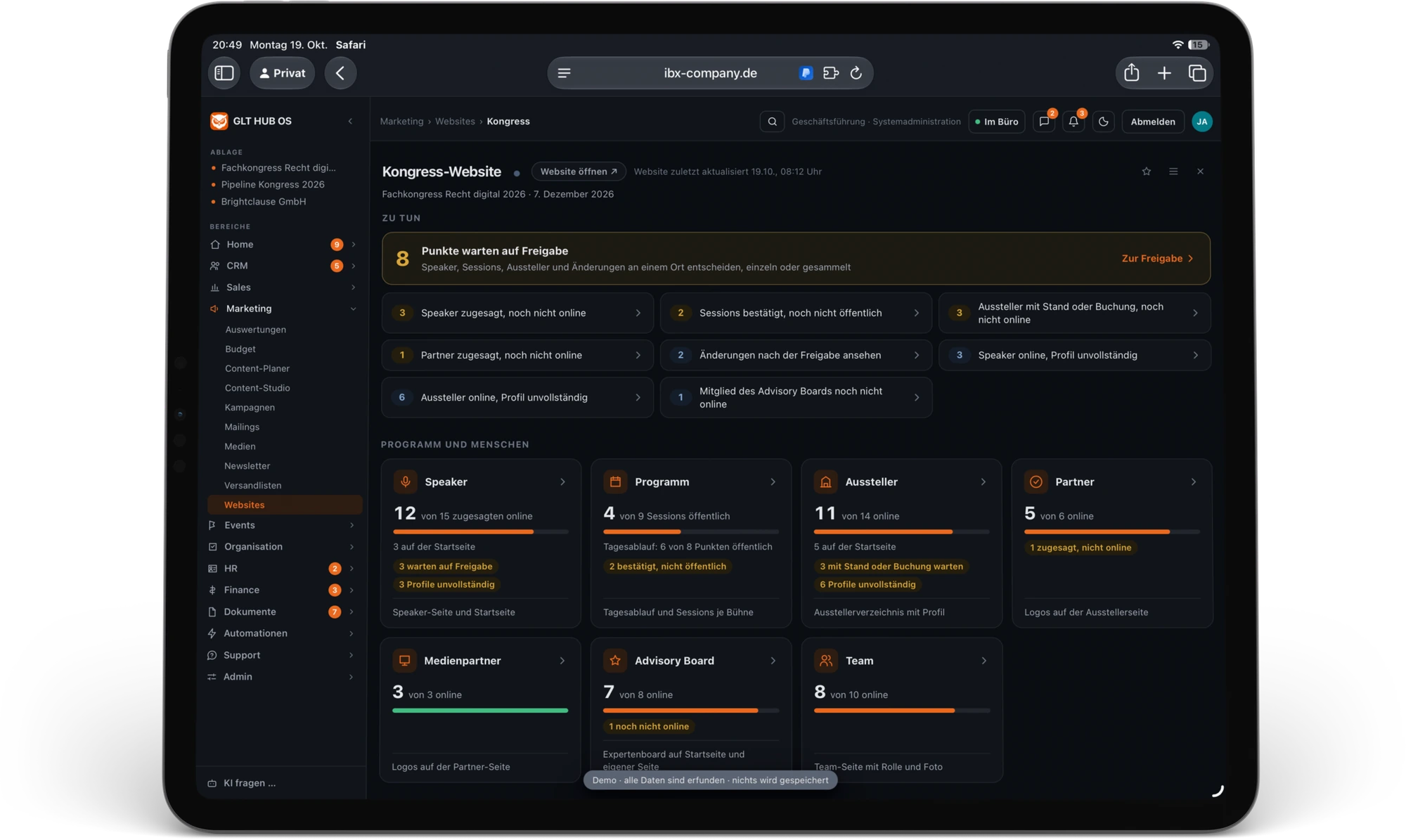
Every event has its own file: bookings, programme, organisation, finance, website and statistics. The programme planner holds stages, slots and people. If a slot changes, the partner is notified automatically. Floor plan, stand list, budget, suppliers and guest list are attached to the same file.
 Demo, invented data
Decision in detailPortals instead of email threads
- Challenge
- Speakers, exhibitors, partners and moderators send photos, texts and logos. By email, things easily get lost or arrive twice.
- Decision
- Each group maintains its own profile in a dedicated portal and signs in with a code sent by email. Exhibitors get a web app for their profile and stand meetings, with notifications on their phone.
- In daily use
- Whatever is maintained in the portal and approved in the Hub OS appears on the Summit website without any further step.
- Bookings and admission
Acceptances, cancellations and companions, admission on mobile. Dedicated registration pages with invitation and cancellation link.
- Certificate of attendance
After the event, the certificate under § 15 FAO goes out automatically.
- Online events
Everyone registered receives the invitation to the Teams meeting, and the participant list stays hidden.
- Ticket shop
Tickets are bought directly on the Summit website, by card or on invoice. Orders, codes, withdrawals and revenue per event are in the Hub OS.
 Demo, invented data
03Publish
Maintained once,
published everywhere.
The Summit website pulls its content from the Hub OS: speakers, programme, stages, exhibitors, partners, floor plan, topics, FAQ and the magazine. Only approved content is published, instantly at the push of a button. The English version is created by AI.
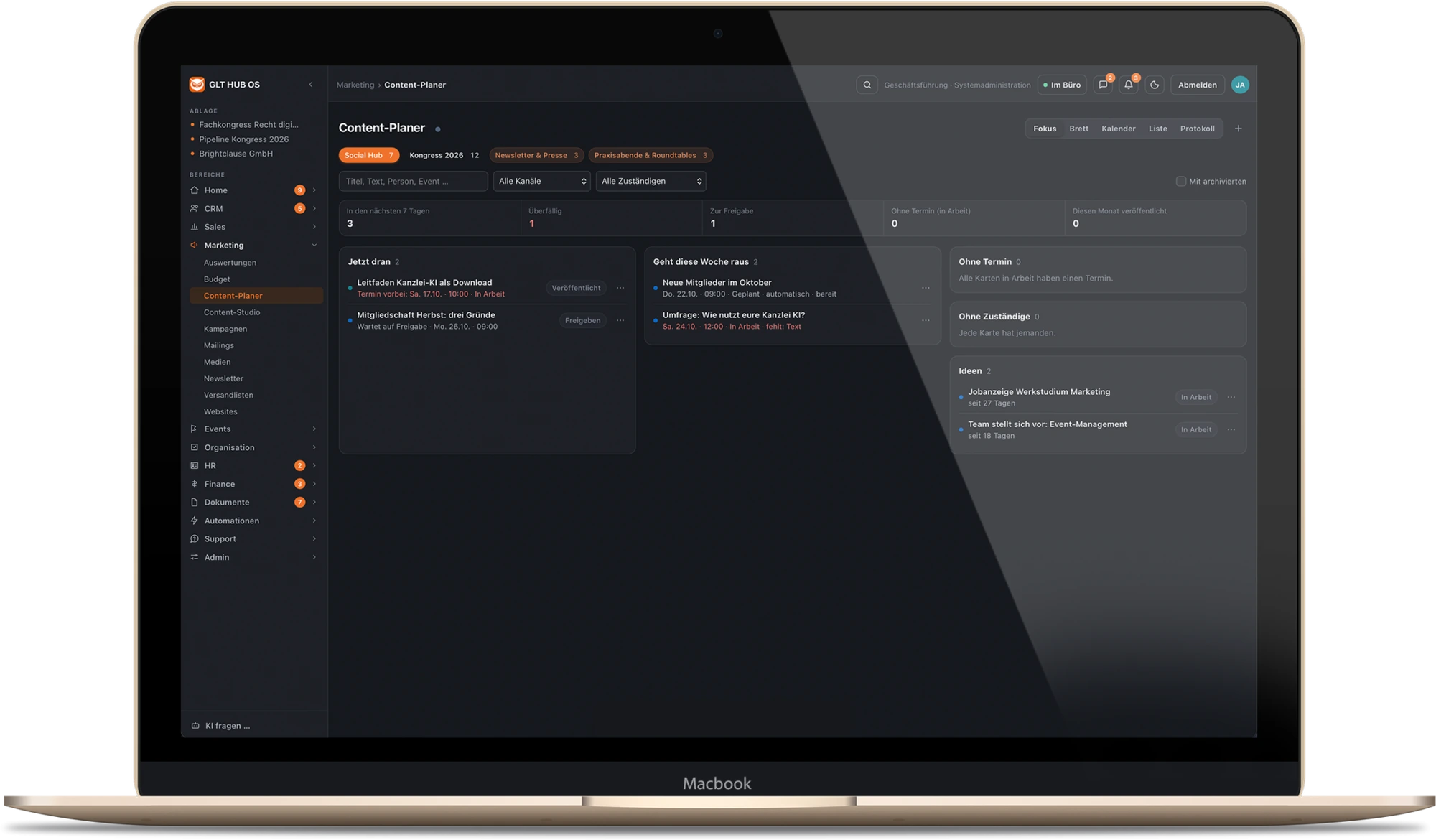
For social media, the team plans in the editorial calendar: texts per channel within each platform’s character limits, image crops per channel, scheduled posting. The events on the Hub’s own website also come from the Hub OS.
Decision in detailOne source for all channels
- Challenge
- Programme, speakers and partners keep changing until shortly before the congress. Every change had to be repeated in several places.
- Decision
- Content is created once in the Hub OS and distributed from there: to the website, the newsletter and the social media channels.
- In daily use
- If a slot in the programme changes, the change appears on the website after approval, without anyone touching the page.
- Magazine
Articles with authors and categories in the block editor, with AI help for writing.
- Social media
LinkedIn, Facebook, Instagram, Threads and YouTube from one plan, statistics per post.
- Content studio
Canva per company, custom templates and a media library with folders.
- Visitor statistics
Page views, clicks and time on page for both websites, without third party services, with analysis by the AI.
04Accompany
Three apps
for the Summit.
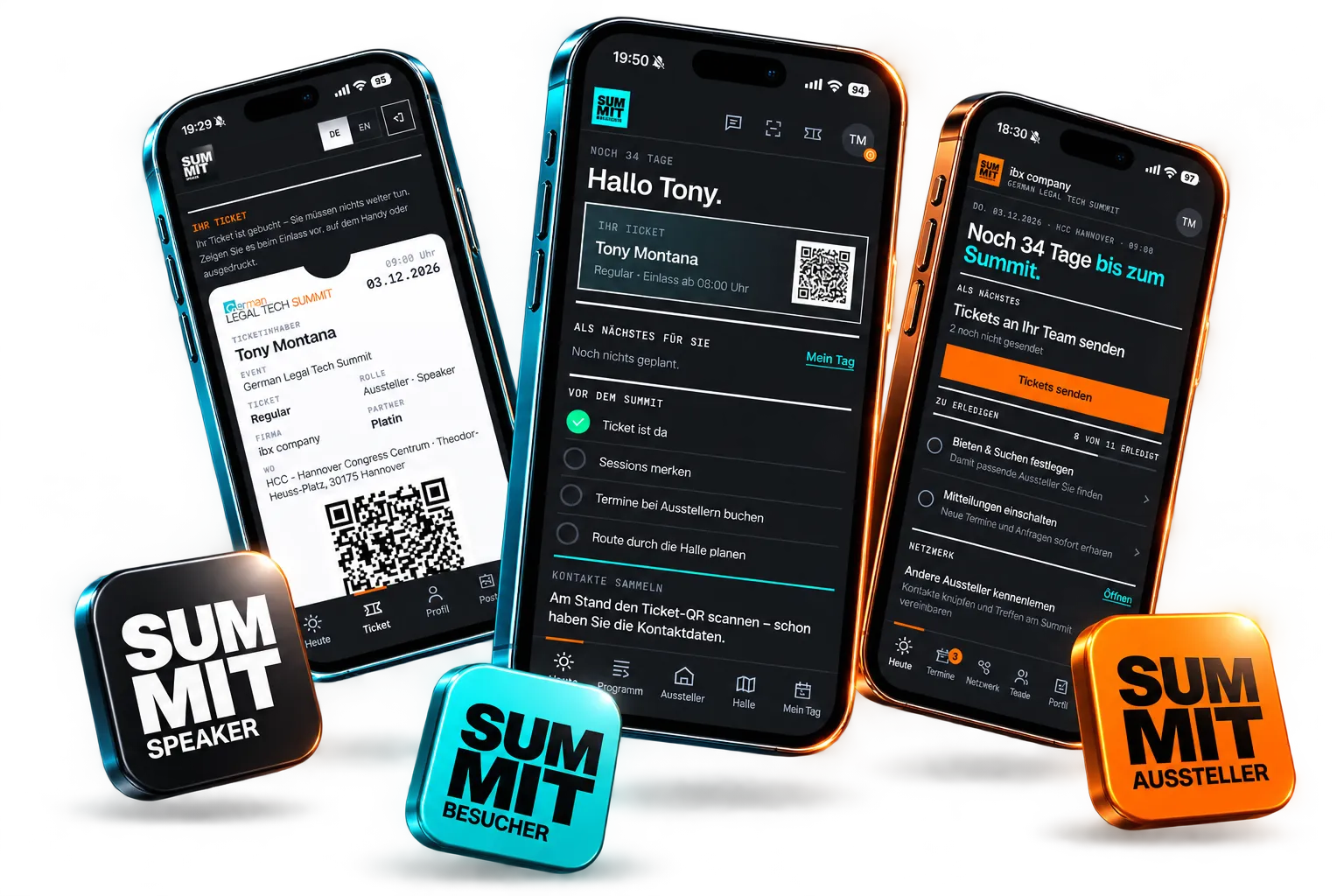
For the German Legal Tech Summit, the Hub OS provides three apps of its own: for speakers, exhibitors and visitors. They open in the browser and go on the home screen, without an app store, and signing in works with a code sent by email. Tickets, programme and meetings come straight from the event file, and changes by speakers and exhibitors land in the team’s inbox.
 Demo, invented data
Decision in detailAn app for each group
- Challenge
- On the day, speakers, exhibitors and visitors need different things: their sessions, meetings at the stand, the programme and a route through the hall.
- Decision
- Instead of one app for everyone, each group gets its own, with exactly its tasks. All three read from the same event file in the Hub OS.
- In daily use
- If a slot or a meeting changes, everyone sees it right away, without anyone sending lists.
- Speaker app
Today with invitations and sessions, ticket with QR code and guest tickets for Speaker & Friends, profile with photo, biography and images, “Meet me at” posts ready for social media.
- Exhibitor app
Meetings at the stand with a daily plan, invite and check in guests, stand and contact persons, network among exhibitors, tickets for the team, profile with logo. New bookings arrive as a notification on the phone.
- Visitor app
Ticket with QR code, programme with a watch list, exhibitors with meeting booking, hall plan with a personal route, My day and speed dating.
- Run from the Hub OS
All three in German and English. In the Hub OS the team sees who uses the app and analyses sessions, meetings and topics.
 Demo, invented data
05Reach
Newsletter, mailing
and letter under one roof.
The Hub OS sends newsletters itself, and the previous newsletter tool has been switched off. A builder, an approval link for the team, a test email, then the send. Opens and clicks flow back, and following up takes one click.
Letters go the same way: company letterhead, text template with placeholders, finalised with a number. Printing, enveloping and postage are handled by a service provider, also as registered post.
Decision in detailIn-house sending instead of rented tools
- Challenge
- Newsletters, mailings and letters each had their own tool with its own list and its own licence.
- Decision
- Mailing lists live in the Hub OS and maintain themselves based on rules, for example all speakers or all exhibitors. Sign up with confirmation, unsubscribe with one click.
- In daily use
- One list, one sender, one report, and no more licence for a newsletter tool.
- Mailing lists
Fixed lists and rules, with a sending block per domain.
- Personal mailings
Sent individually from your own mailbox, with signature.
- Enquiries
Enquiries from the website and by email become cases, and the AI drafts the reply.
- Letter dispatch
Mail merge letters, documents and payment reminders by post, with the status checked continuously.
 Demo, invented figures
06Finance
Accounting and financial control
in the same system.
Incoming invoices arrive from the mailbox or as a photo, the AI reads amounts, taxes and suppliers, and the team approves. Outgoing invoices are created from sales, and dunning runs on schedule. Bank statements are imported and matched.
In financial control, plan and actuals for income, costs, products and events sit side by side, together with a liquidity forecast covering 13 weeks. For the tax adviser, the system produces a package with a booking batch in DATEV format, receipts and a checklist.
Decision in detailTrial run instead of a leap
- Challenge
- Accounting and payroll do not tolerate experiments. Mistakes here cost money and trust.
- Decision
- Finance runs in trial mode alongside the previous processes until the end of the year. The accounting software and the tax adviser remain authoritative, and the payroll calculation is compared with the payroll office and not saved.
- In daily use
- Every figure can be checked against the previous result before the Hub OS takes it over as binding.
- Reports
Management accounts (BWA), open items and trial balance as PDF and spreadsheet.
- Checks
VAT ID verification with the Federal Central Tax Office, ECB exchange rates, EC Sales List.
- Contracts and subscriptions
Ongoing contracts, fees, subscriptions and refunds in one place.
- Payroll
Recognise payroll office documents in emails, calculate wage tax and social security using the official procedure, on a trial basis.
 Demo, invented data
07Organise
The working day
starts in the Hub OS.
Inbox, calendar and Teams chat are built into the system, with the Outlook mailboxes mirrored alongside. Tasks can be assigned and passed on, and the AI recognises tasks in chats. Documents from emails are filed automatically.
In their personal area, everyone finds payslips, overtime, travel costs and expense claims. Holidays and sick notes go through HR, and the AI reads employment contracts.
Decision in detailIntegrating Microsoft 365 instead of replacing it
- Challenge
- Email, calendar and chat had long been running on Microsoft 365. A new system must not duplicate that.
- Decision
- The Hub OS reads and writes via the Microsoft interface: emails, appointments, Teams chat and meetings. Planned sales steps appear in the Outlook calendar of the person responsible.
- In daily use
- Nobody maintains anything twice, and anyone on the road has everything on their phone.
- Frida
The AI assistant searches the entire database, answers by text or voice and completes tasks at the push of a button, only with the person’s permissions.
- Web app
Installable on mobile, with a dedicated mobile interface for almost every page and notifications on the device.
- Roles and permissions
Permissions per area and record. The admin can simulate a role to see what it sees.
- Backup and monitoring
Encrypted backup with restore, health and security checked every ten minutes.
Result
One system
instead of many tools.
In just under six weeks, twelve areas with 85 subpages have been built. According to the team, it gains around 70 working hours a month. By doing without third party tools and services, the team says it has saved around €100,000 so far and saves around €1,500 a month on an ongoing basis.
Work is under way on an AI phone service, in-house payroll, maintaining the Hub’s website directly from the Hub OS and reconciliation with the previous accounting software.
- 01One database for two companies
Contacts, deals, events and receipts in one place instead of several tools and a master list.
- 02From contact to receipt
Quote, signature, invoice, booking and report all draw on the same data.
- 03Independent of licences
The newsletter tool is switched off, the previous CRM is being phased out, and the planned licence package is no longer needed.
Appointment
A similar process
in your company?
In a 30-minute initial call we clarify where the biggest lever is and what a first, manageable step looks like. Pick a free time right here. You receive a confirmation with a calendar entry and can move or cancel the appointment yourself.
Prefer to write? info@ibx-company.de
Choose a day for your initial phone call (30 minutes).
Loading your appointment …