Wieland Gebäudereinigung GmbH
The whole business
on one platform.
Management, office and field staff work with the same up to date information, on every device. Streamlined processes reduce admin work and free up time for the core business.
All references

 DemoTry it yourself

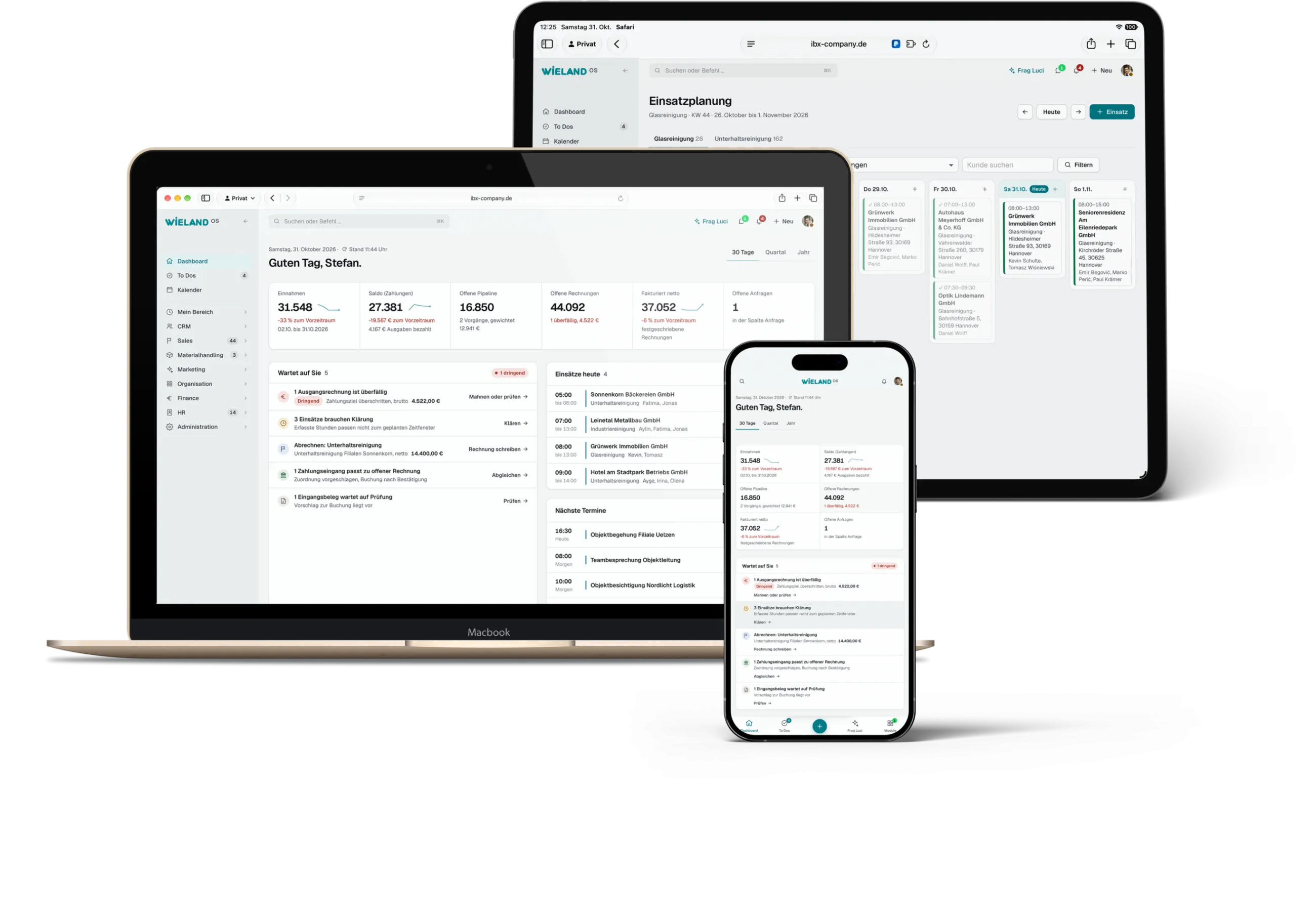 Demo, invented data
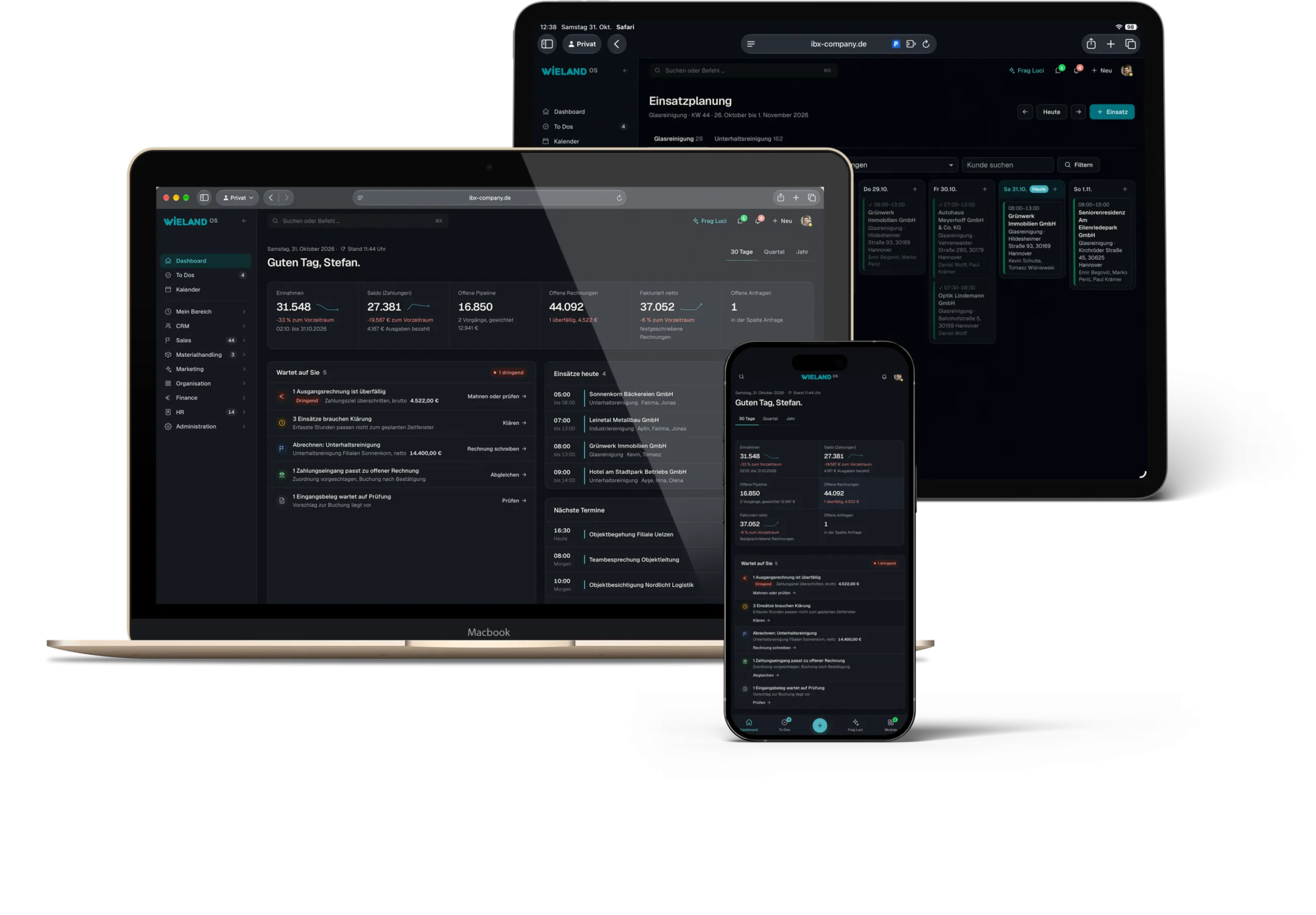
Case study · Commercial cleaning
Wieland Gebäudereinigung GmbH. Wieland OS: business software with job planning and a staff app for a commercial cleaning company.
One business. One shared system.
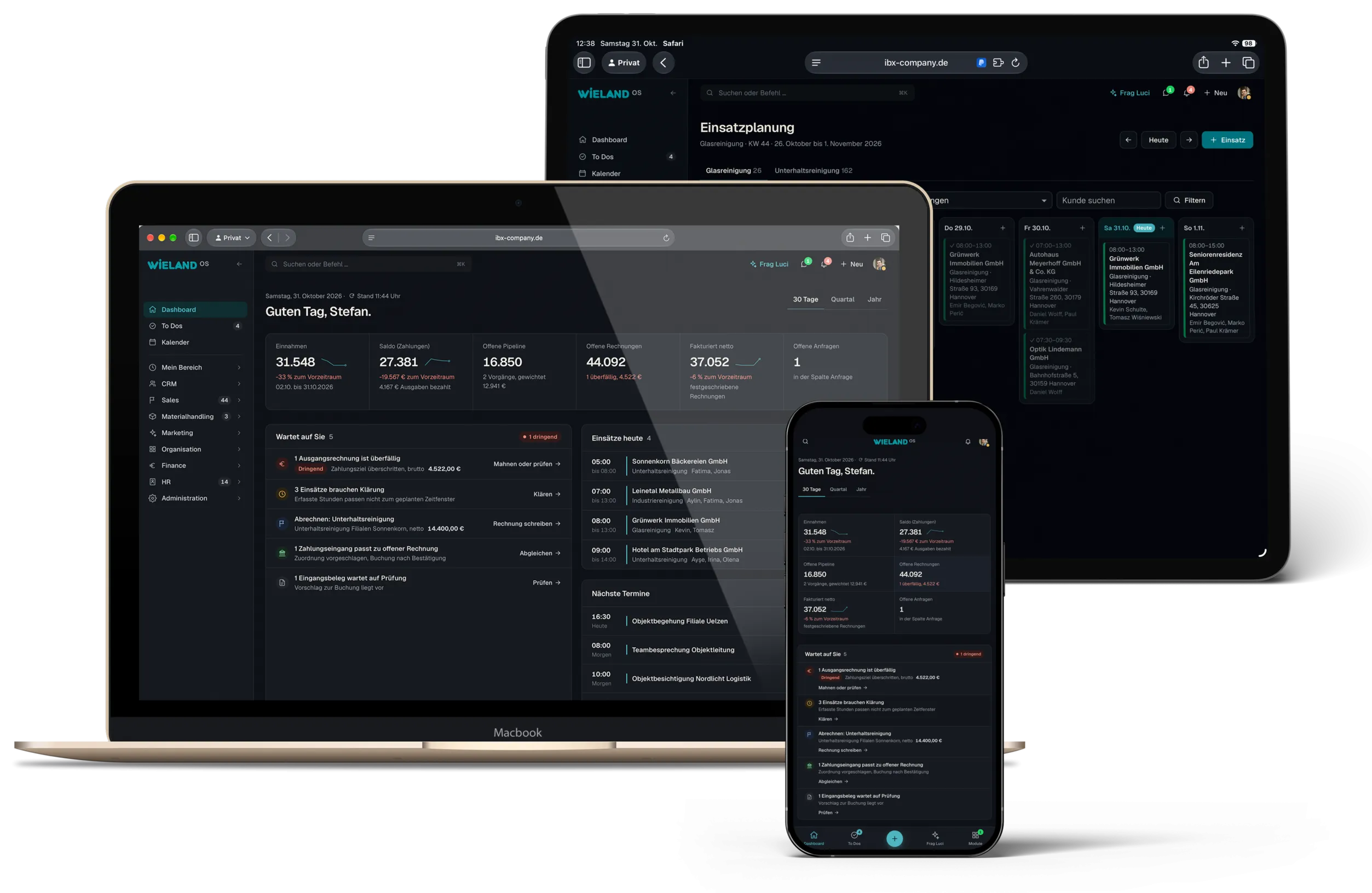
Wieland OS is the custom business software of Wieland Gebäudereinigung GmbH from Burgdorf, with around 150 employees. ibx company designed and developed it and runs it on a dedicated server in Germany. The office plans jobs and writes quotes, contracts and invoices. The team records hours and materials in the staff app, in German, Bosnian or English.
- Company
- around 150 employees, about 1,000 customers
- Services
- Concept, design, development, operation and integrations
- Technology
- Custom web app on its own server in Germany, PostgreSQL database
- Status
- 2026, in operation
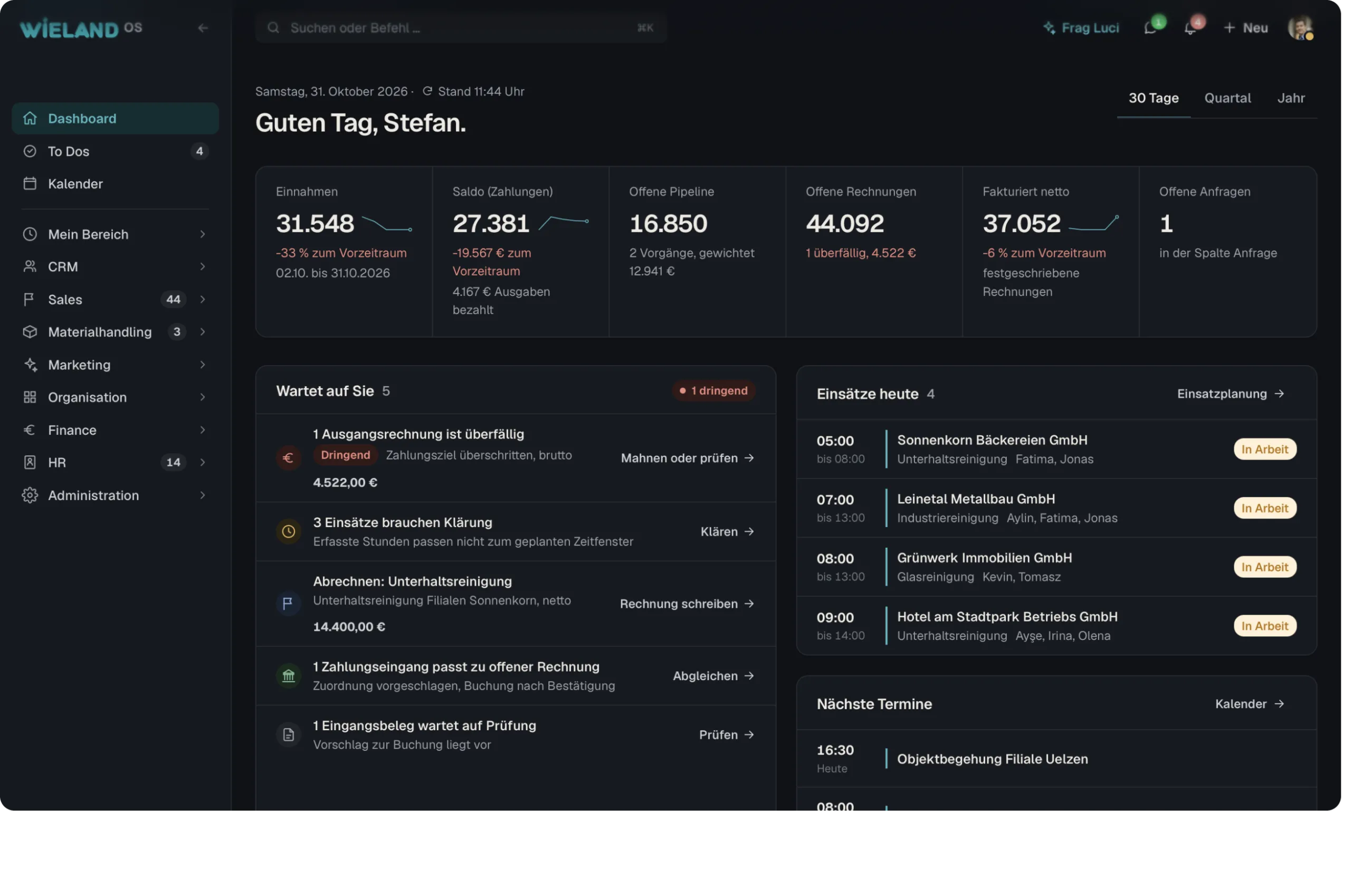
Around 150 employees are out working for about 1,000 customers every day, always in different places.
All of this used to be organised through chat groups, spreadsheets, notes on paper and phone calls, plus separate programs for invoices, staff and materials. Every answer cost time and nerves. The managing director had looked at off the shelf software, but there the business would have had to adapt to the program.
So we built Wieland OS, cleaning company software of its own that works exactly the way the business works. What began as job planning has become the operating system of the whole company: sales, jobs, staff, materials, finance, marketing and the website run on the same data, at a desk in the office and on a smartphone out in the field.
Before
- Jobs and responsibilities scattered across several channels
- Working hours painstakingly pieced together
- Contracts and records in folders and inboxes
- No overview of materials, stock and vehicles
- Invoices, bookkeeping and HR in separate programs
- Duplicate data entry, many software licences
- Officeplans, writes, invoices and books
- Wieland OSone data basis on its own server
- Field staffget things done on site in the staff app
Connected Microsoft 365 and Teams · WhatsApp Business · LinkedIn, Facebook, Instagram · ELSTER and DATEV
Features
What Wieland OS
covers.
Twenty seven areas, one data basis. The five moments below show what this looks like day to day.
Sites with a fixed team
For maintenance cleaning, every site has a fixed team and a weekly plan with times and tasks per person. Jobs are created from it, and holidays and sick leave block the planning.
Sick notes from the app
Anyone who reports sick is taken off their jobs, management gets a notification and the jobs flash in the planning view. Dispatch opens them for applications or assigns someone else.
Invoicing, target and actual
Draft invoices per customer are created either in Wieland OS or in Lexoffice, and every month gets a timesheet as a PDF. For each site, the agreed price is set against the hours clocked.
Customers and enquiries
Contacts with contact persons and sites. Enquiries from the website, by email or WhatsApp arrive as a case with a task on the board, notes sit right on the contact.
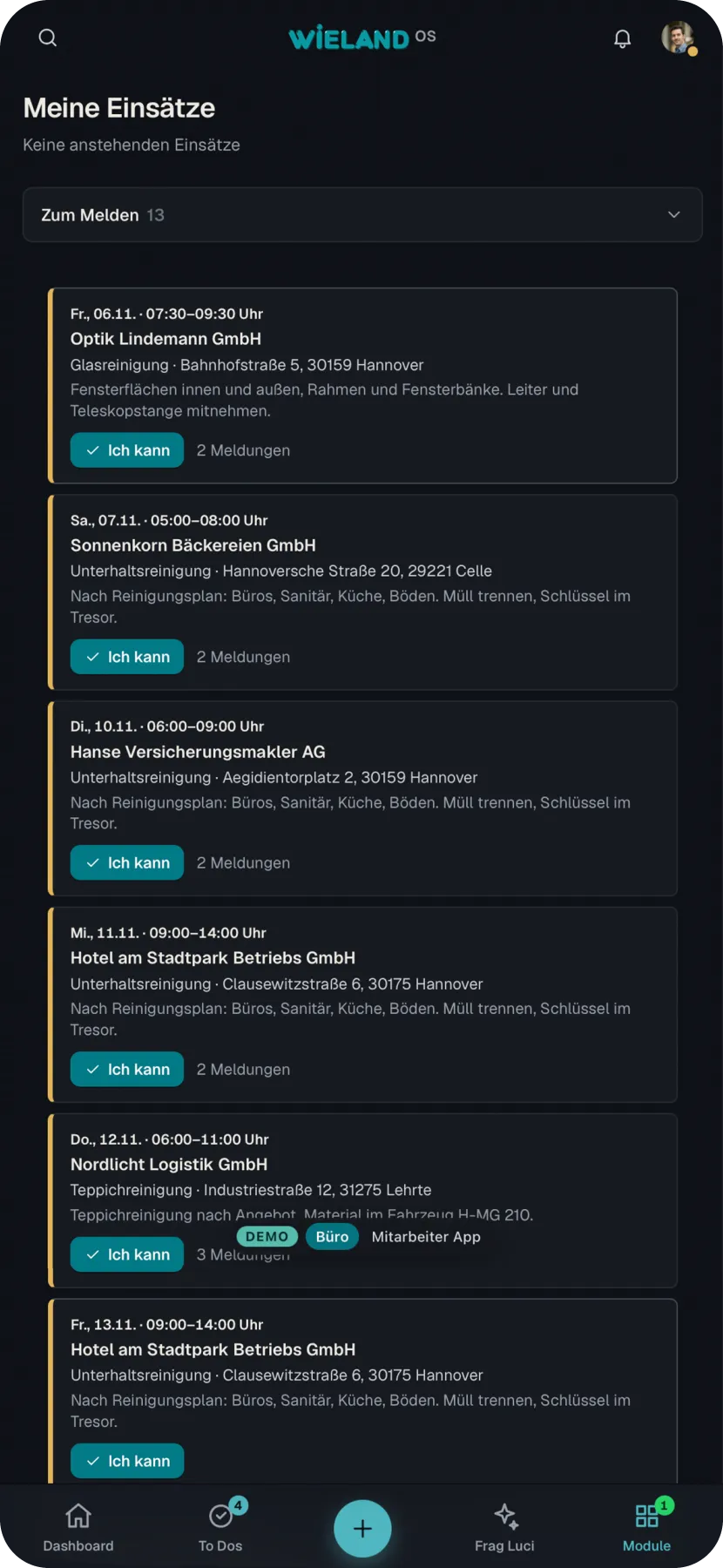
Job planning
Jobs with customer, site, service and team, a clear status from planned to completed, a calendar per person.
Staff app
Jobs, hours, materials, leave, documents and messages on the smartphone, in German, Bosnian and English.
Hours through to the invoice
Hours from the app, follow up cases when they differ, approval and a draft invoice per customer at the push of a button.
From quote to invoice
Service specification, quote, order confirmation and invoice in the same editor, with the finished PDF on the letterhead alongside.
Digital signature
Customers and staff sign in the browser, confirmed by a code, with a log and checksum attached to the PDF.
Contracts in three languages
AI translates employment contracts and safety briefings into English and Bosnian, the German version remains binding.
Documents, letters and post
Create, keep every version, send by email, for signature or as a real letter. Copies are filed in OneDrive.
Inbox with AI
The office sorts letters, emails and enquiries by hand or with an AI suggestion. AI drafts the reply in the letter editor, sent by email or as a letter.
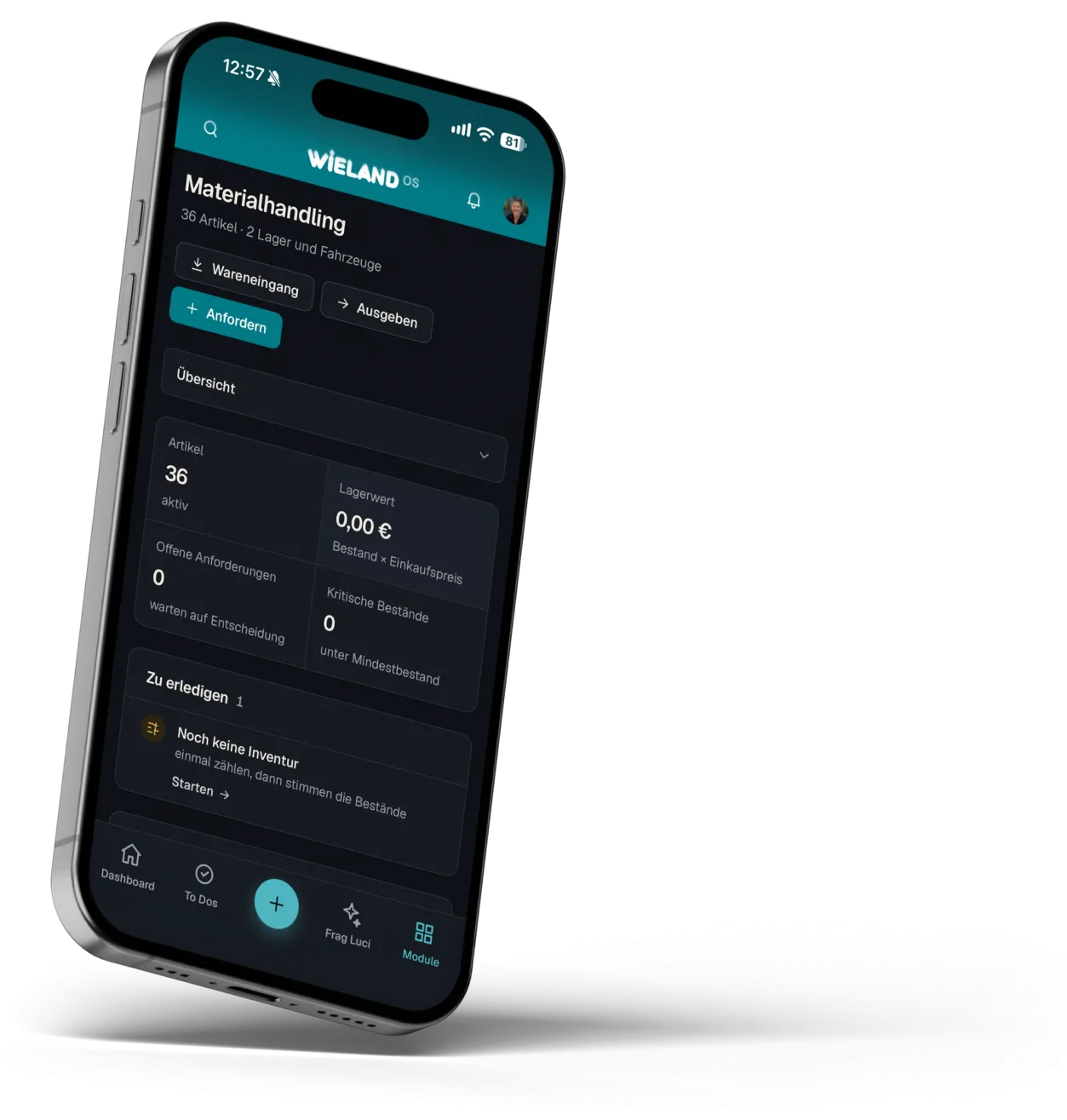
Materials handling
Items with photo and data sheet, warehouse and vehicles, requests from the job, bookings and stocktaking.
Bookkeeping for a GmbH
Double entry bookkeeping to SKR03 with AI pre-posting, bank reconciliation, management reports, trial balance, open items, balance sheet and P&L.
E-invoices and duplicates
E-invoices arrive through their own mailbox. A scanner finds duplicate receipts and documents before anything is posted twice.
HR
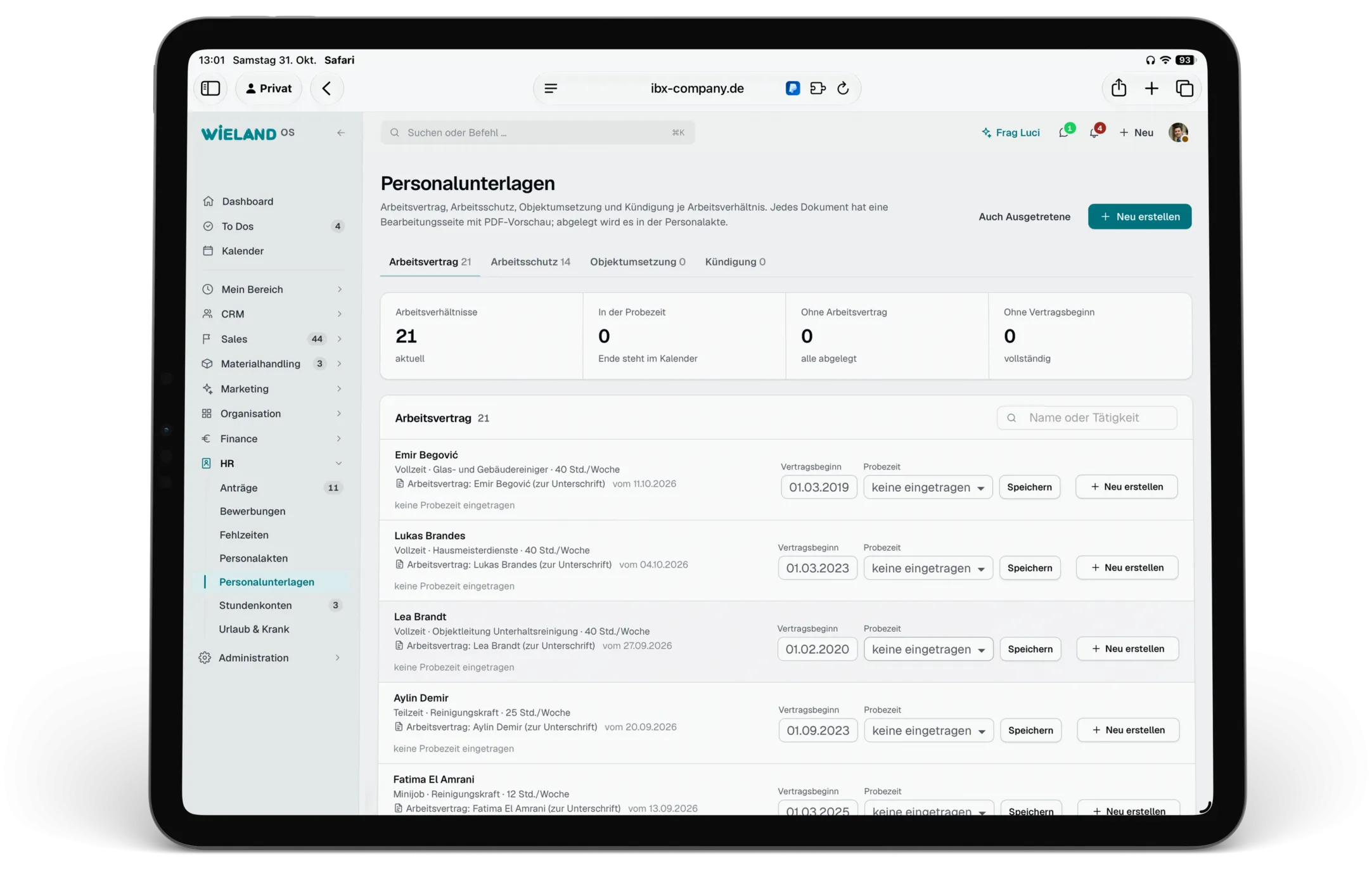
Personnel files, hour accounts, leave and sickness, absences, requests and due safety briefings in the calendar.
Applications
Applications from the website arrive with their documents and become a personnel file with one click on an offer.
Marketing with AI
AI drafts news articles and posts per channel, the office approves them. Customer and jobs newsletters with their own dispatch, blog and website from the same system.
Social media
LinkedIn, Facebook and Instagram are connected. The office publishes posts straight from Wieland OS, reads and answers comments and hides unsuitable ones. When a new comment arrives, a notification appears in the system right away.
Media library
Images in folders, sorted by drag and drop and mirrored in OneDrive. The website images were taken over with their alt text.
Appointment reminders
Customers receive an email reminder before the job, can be switched off per customer, with an overview of sent reminders and unsubscribes.
Microsoft 365
Outlook calendar per person both ways, Teams meetings straight from pipeline and calendar, all documents filed in OneDrive by type and date.
WhatsApp and email
The office number sends and receives in the system, mailboxes for outgoing mail, receipts and enquiries are connected.
Frag Luci
The built in AI answers questions about appointments, jobs and figures and explains how things work. It only sees what the person asking may see.
Own server in Germany
Database, application and website in separate containers, backed up every night, with an encrypted copy in a second location.
Website in six languages
German, English, Bosnian, Turkish, Bulgarian and Spanish. After saving, AI translates changed texts and the website refreshes itself.
Security
Sign in with a passkey or authenticator app, roles with permissions per area, a sign in log and automatic sign out.
 Demo, invented data
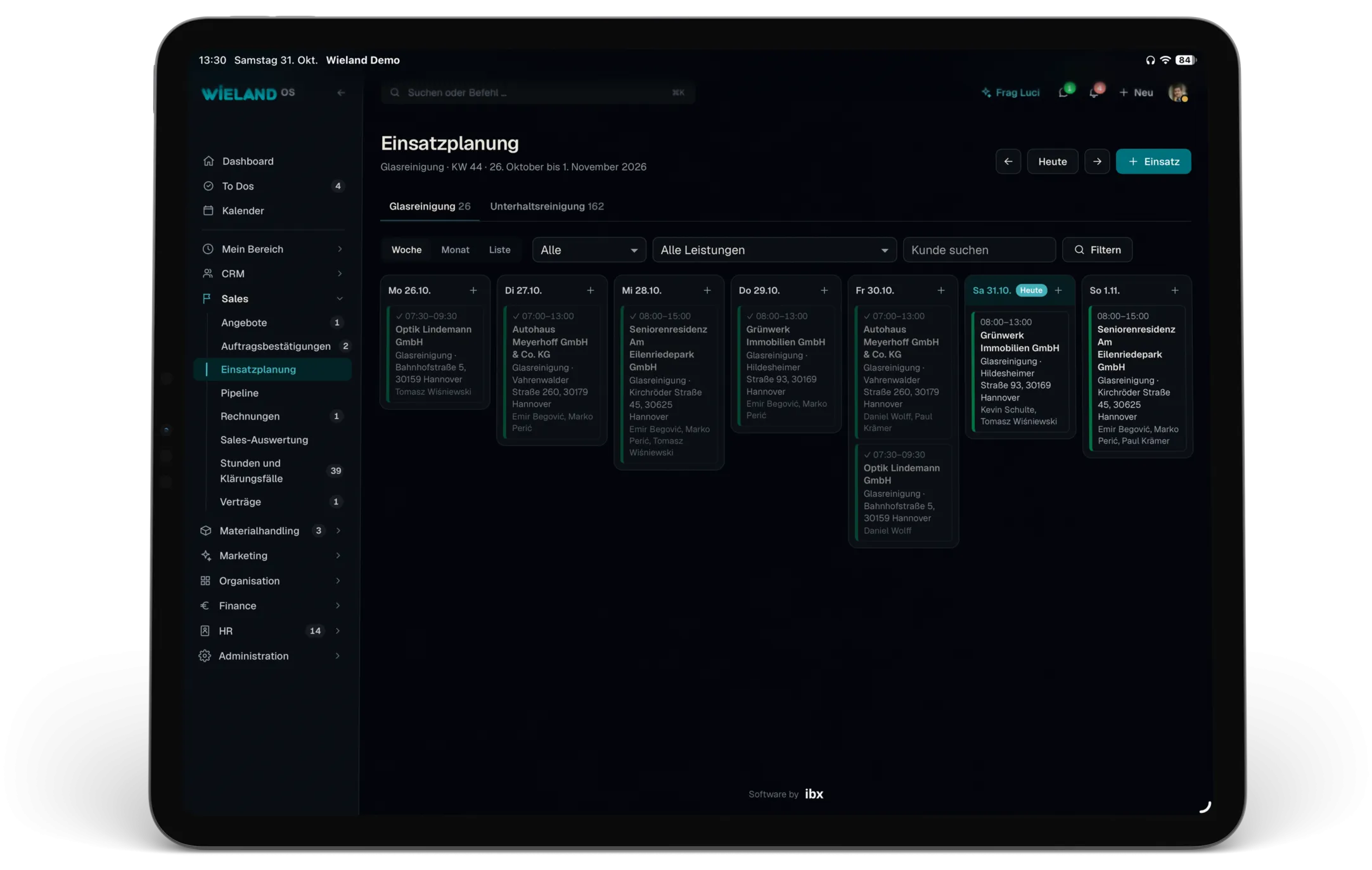
01Job and shift planning
The office plans in one place.
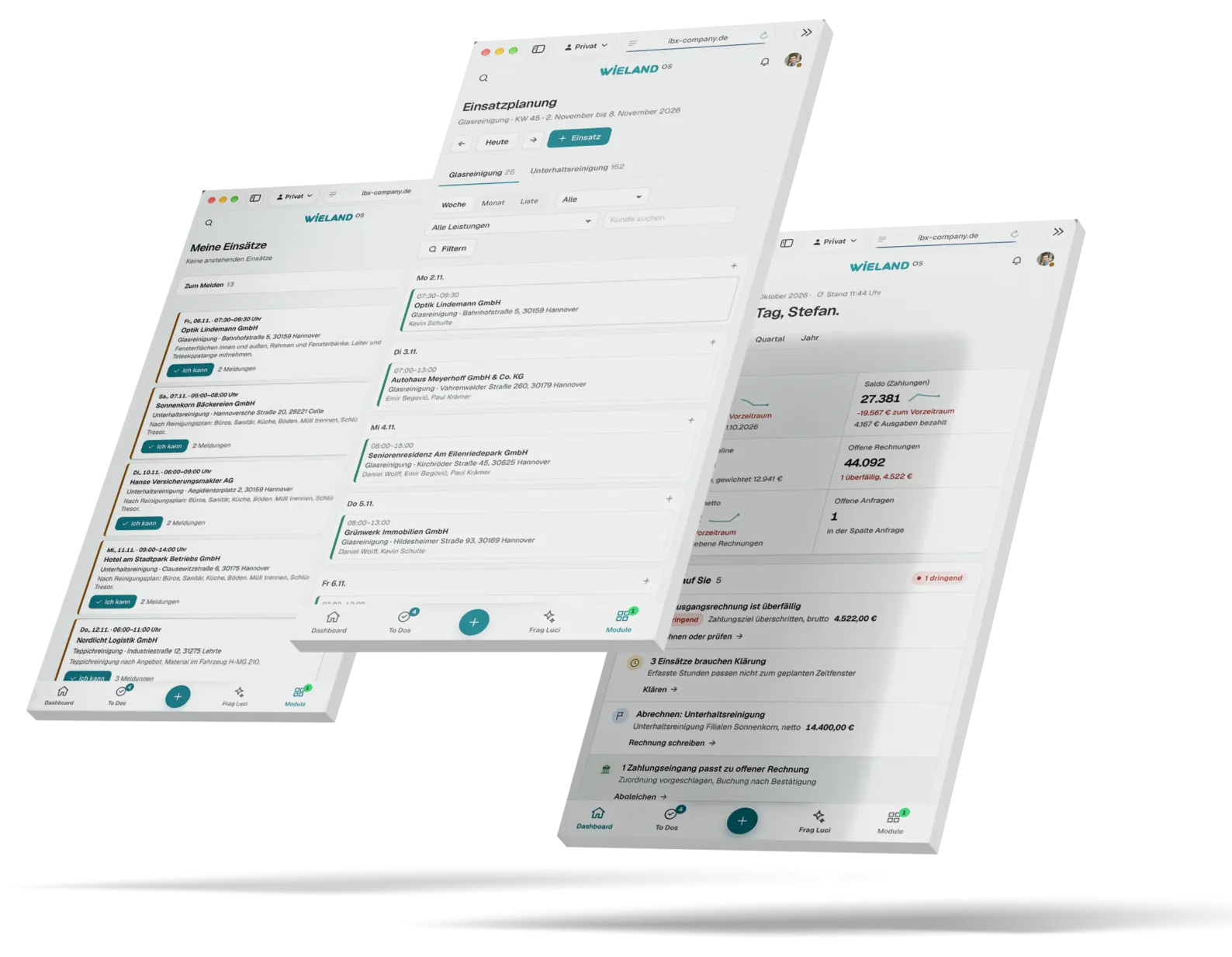
Jobs are created with customer, site, service and team and carry a clear status from planned to completed. In the weekly view the office sees at a glance who is with which customer and when.
The calendar shows day, week or month per person. Appointments are moved with the mouse, and everything syncs with Outlook in both directions.
Decision in detailRules instead of recalculating
- Challenge
- Hours, leave and sick notes lived in spreadsheets and chat groups. How many hours someone had worked had to be pieced together by hand.
- Decision
- Target hours, leave and sick notes belong to the person in the system. If someone exceeds their monthly hours, the planner gets a notice. If planned and worked hours for a job do not match, the system opens a follow up case.
- In daily use
- The managing director plans jobs without keeping lists on the side. In his words: “I hardly have to think about it any more.”
- Calendar per person
The management sees every calendar, everyone else only their own.
- Outlook
Appointments sync every 15 minutes in both directions.
- Open shifts
If someone drops out at short notice, the shift is opened up for staff to apply for.
- Jobs today
The dashboard shows what is running now and what comes next.
02Get it done on site
Out in the field, everyone does their part.
In the staff app the team sees its jobs, records hours and requests materials straight from the job. The customer signs the work report on the phone. Leave is requested there, pay documents and contracts are kept there and signed in the app. Everyone chooses their language: German, Bosnian or English.
“My people out in the field have practically become part time office staff themselves.”
 Demo, invented data
Decision in detailWeb app instead of app store
- Challenge
- The field staff have very different levels of experience with technology and different native languages. The biggest worry beforehand: will everyone cope with it?
- Decision
- A web app: open it once in the browser and add it to the home screen. The office sends access by email, WhatsApp or link, and anyone without an email address signs in with a user name.
- In daily use
- No installation, no approvals through an app store. According to the managing director, after a few days nobody wanted to go back to paper.
- Three languages
The app speaks German, Bosnian or English, depending on the person.
- Request materials
Customer and job are already filled in, and the request appears on the office dashboard at once.
- Work report
The customer signs full screen, and the record is in the office straight away.
- Notifications
New jobs, messages and documents arrive on the device as push notifications.
 Demo, invented data
03Write
Contracts and documents,
in three languages.
Service specifications, quotes, order confirmations, invoices, business letters and HR documents are created in the same editor: the details on the left, the finished PDF on the letterhead on the right. Every saved version stays in the archive.
Employment contracts, safety briefings and notices of termination come from the personnel file. AI translates them in full into English and Bosnian, and the document states that the German version is binding. Signing happens via link and code or directly in the staff app.
Decision in detailUnderstood before it is signed
- Challenge
- Many employees do not read German as confidently as their native language. A contract nobody understands leads to misunderstandings later.
- Decision
- That is why every HR document can also go out in English or Bosnian at the push of a button, as its own version in the file. Whatever requires the written form, such as a notice of termination, remains blocked for digital sending.
- In daily use
- Everyone knows what they are signing, and the office has every version with its log in the file.
- Signature with log
Signatory, code, time and checksum of the original are attached to the PDF.
- Sending
By email in the Wieland design, for signature or as a letter via easyNova, also as registered mail.
- Filing
Everything is filed with the customer or in the personnel file, and copies go to OneDrive automatically.
- Templates
The management saves edited texts as the template for all new documents.
04Run it securely
Own server,
own rules.
Wieland OS runs on a server of its own at Host Europe in Germany, with a data processing agreement. It runs separate containers: the database, the application, the website and a web server that encrypts every connection and renews its certificates by itself.
A backup is made every night, with an encrypted copy in a second location. The management sees storage, certificates and the latest backup directly in the settings.
 Demo, invented data
Decision in detailData stays in the business
- Challenge
- Wieland OS holds customer data, personnel files, contracts and the bookkeeping. That does not belong in a collection of rented services that each have to be secured separately.
- Decision
- That is why everything runs on a server that belongs to the business. People sign in with a passkey, Touch ID or an authenticator app, and every sign in and every failed attempt is logged.
- In daily use
- The business always knows where its data is and who can see it.
- Roles and permissions
Management, project leads and staff only see the pages of their role.
- Sessions
Sign out after two hours of inactivity, trusted devices stay signed in for 30 days.
- Immutable
Posted receipts and signed documents are locked, and changes are logged.
- AI with limits
Frag Luci only sees what the person asking may see, and every question is logged.
 Demo, invented data
05Keep track
From the warehouse
to the balance sheet.
Materials, invoices and bookkeeping hang on the same data as the jobs. Staff request materials in their app, the warehouse puts them together and books them out, and the stock keeps itself up to date.
The draft invoice is created from the approved hours, the invoice goes out as an e-invoice, and dunning runs by itself. Bookkeeping is double entry to SKR03, as a GmbH requires: AI pre-posts receipts, bank transactions are matched automatically, and the tax adviser works directly in the system with a login of their own.
Decision in detailOne system instead of many programs
- Challenge
- Data was entered twice between the tools, and many software licences cost money.
- Decision
- Wieland OS handles invoices, bookkeeping, HR and materials itself and only connects what is established in the business: Microsoft 365 for calendar and filing, ELSTER for the VAT return, DATEV for the tax adviser.
- In daily use
- Nothing is maintained twice. According to the managing director, admin effort and software costs are noticeably lower.
- AI pre-posting
Receipts arrive by email, upload or photo, AI reads them and proposes account and tax, and a person approves.
- Bank reconciliation
Bank and cash transactions come in and are matched to invoices and receipts, and open items close by themselves.
- Reports
Management report (BWA), trial balance, open items for customers and suppliers, account sheets, fixed asset register with depreciation, balance sheet and P&L.
- GoBD and tax
Immutable journal, checks for gapless invoice numbers, VAT returns and the annual return via ELSTER, DATEV export.
Result
Less admin.
More clean results.
Instead of chat groups, spreadsheets, notes and separate programs, there is now one system that covers the whole business, from the enquiry to the bookkeeping. That gives time back for what really matters.
- 01One place for everything
Sales, jobs, HR, materials, finance and the website on the same data.
- 02Done where the work happens
Hours, work reports, materials and signatures are created on site in the staff app, in three languages.
- 03Secure in house
Own server in Germany, strong sign in, roles and nightly backups. According to the managing director, admin effort and software costs are noticeably lower.

“My head is clear again for what really matters.”
Client testimonial“With ibx and Michel Winkler, we have a reliable partner at our side. The results are not only visually convincing but also add real value to our daily processes. We particularly value the ability to get to grips with new topics quickly and to develop many solutions independently. Time and again we are delighted by the fast implementation and the well thought out results.”
Appointment
A similar process
in your company?
In a 30-minute initial call we clarify where the biggest lever is and what a first, manageable step looks like. Pick a free time right here. You receive a confirmation with a calendar entry and can move or cancel the appointment yourself.
Prefer to write? info@ibx-company.de
Choose a day for your initial phone call (30 minutes).
Loading your appointment …